Aircall and HubSpot integration: a powerful tool for synchronizing telephony and CRM


When Aircall meets HubSpot
Ambitious businesses know that successful customer service and sales force require tools that are perfectly connected. On the one hand, telephony remains an essential channel: incoming calls, follow-up prospecting, technical support, commercial reminders. On the other hand, CRM focuses all strategic information on your customers and prospects.
By connecting Aircall And HubSpot, you bring these two worlds together in a smooth and integrated experience. This synergy is not limited to a simple call recording; it becomes a powerful foundation that transforms customer relationships, data quality and team productivity.
In this article, you will discover the concrete benefits of this integration, the methods of implementation, as well as practical advice to make it a solid operational lever.
Why connect Aircall and HubSpot?
Aircall is a cloud telephony solution that is particularly suitable for sales teams and customer support. Its user-friendly interface and its ability to manage mobile calls make it a reference tool for businesses that want to modernize their telephony.
HubSpot, on the other hand, centralizes customer relationship management, sales pipelines, marketing automation, and after-sales service. If these two systems work independently, you risk wasting valuable time re-entering information from tool to tool and lacking visibility into the complete customer journey.
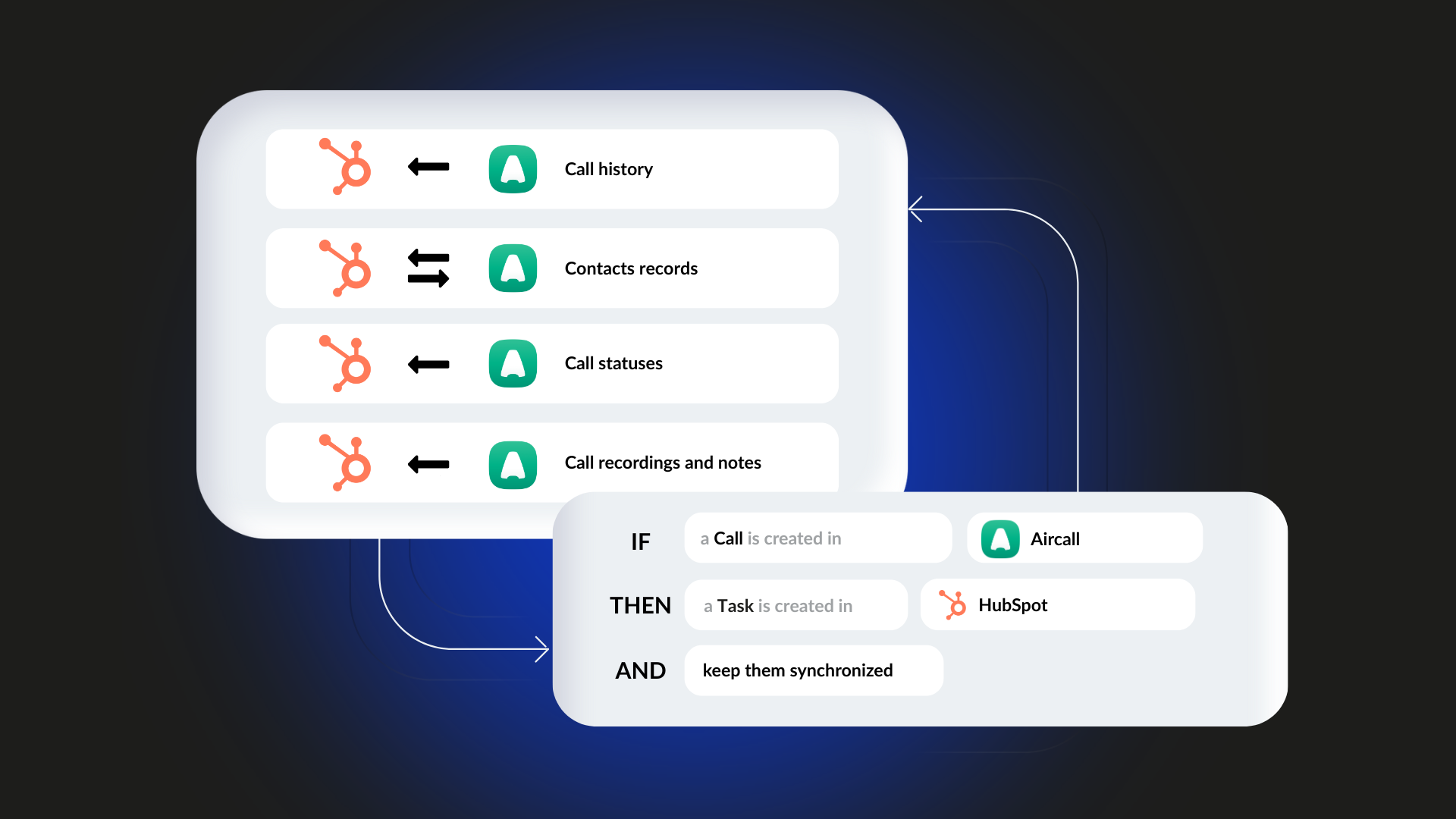
By connecting Aircall and HubSpot, you have access to a unified vision: every call is automatically recorded in the CRM, whether it's an incoming, outgoing, or missed call. The conversations are recorded in the corresponding contact or company file. You can review audio recordings, take contextual notes, and trigger automatic actions after a call.
This integration not only promotes business responsiveness, but it also contributes to improving data quality and unifying processes between sales and support teams.
How does technical integration work?
The integration of Aircall and HubSpot is based on an official application available in the HubSpot App Marketplace. Installation is simple and can be done without advanced technical skills.
Once the app is set up and connected to your HubSpot account, each call is automatically synced. When a prospect contacts you, Aircall identifies their number and links the call to the corresponding contact sheet. If the number is unknown, you can create a new HubSpot contact in one click.
For each phone interaction, an activity is created in the HubSpot Timeline. This activity contains the date, duration, direction of the call, status (answered, missed, voice), the link to the audio recording, and possibly a call quality score. The agent can also enrich the form with notes and specific tags that will facilitate follow-up.
Finally, integration can extend to the creation of automatic workflows: for example, you can set up HubSpot to trigger a follow-up task after a missed call or send a summary email to the customer after a phone call.
How to optimize integration
The implementation of a telephony-CRM integration must be accompanied by a reflection on your business processes and your operational organization.
First and foremost, it's important to prepare your data and check that your HubSpot contacts are well-informed, especially phone numbers in a standard international format. This harmonization will facilitate the automatic recognition of incoming calls and reduce the creation of duplicates.
It is also recommended to clarify the roles and responsibilities of each team. Integration makes information more transparent: sales management, customer support, and finance can access call recordings and notes. It is therefore essential to establish clear rules about who has access to what and how data should be filled in after each interaction.
For adoption to be smooth, take the time to train teams. Even though the Aircall interface is intuitive, the discipline of use (for example, the systematic entry of notes or the tagging of calls) plays a major role in the quality of CRM data. It may be useful to develop internal guides or checklists recalling best practices.
When it comes to automation, it's best to start with simple, concrete scenarios. For example, you can create an internal notification when an important incoming call is missed or set up an automatic follow-up sequence after a strategic call is concluded. By progressing gradually, you secure the quality of workflows and limit side effects.
Finally, safety must remain a priority. Centralizing call recordings in HubSpot involves finely controlling access rights and data retention periods. Consider setting granular permission levels, regularly auditing access, and making your teams aware of the confidentiality rules applicable to telephony and personal data.
Conclusion
Connecting Aircall and HubSpot isn't just about technical convenience. It is a structuring approach that makes it possible to harmonize exchanges with your customers and increase the responsiveness of your teams. By synchronizing telephony and CRM, you benefit from complete traceability of interactions, better data quality and more precise commercial management.
To succeed in this integration, it is essential to carefully prepare your data, to support your teams in the appropriation of the tools and to set up clear and secure processes. A progressive and pragmatic approach will help you transform this connection into a real operational lever, at the service of commercial performance and customer satisfaction.